Robotics Hardware Engineering Builds the Body a Robot Depends On
Robotics hardware engineering is the discipline of designing, selecting, assembling, testing, and improving the physical systems that let a robot move and survive. It includes frames, joints, wheels, actuators, grippers, bearings, sensors, batteries, wiring, enclosures, fasteners, cooling paths, materials, and service access. Software may decide what a robot should do, but hardware determines what the robot can physically do, how accurately it can do it, and how long it can keep doing it.
A: No. It includes structure, actuation, power, wiring, sensors, materials, packaging, and service.
A: Flexible structures change alignment and make accurate control harder.
A: It matches torque, speed, duty cycle, heat, and load to the task.
A: Cables must survive motion, vibration, heat, current, and maintenance.
A: Mounting, protection, alignment, and load paths affect measurement quality.
A: Small complete robots teach more than large systems with hidden parts.
A: Repeated motion exposes heat, wear, loosening, drift, and fatigue.
A: Accessible fasteners, connectors, modules, logs, and calibration steps.
A: They shape weight, stiffness, durability, heat, friction, and manufacturing cost.
A: Build a physical system that behaves predictably under real use.
Hardware Gives the Robot Its Physical Limits
Every robot begins with physical limits. A frame has stiffness and weight. A joint has range and backlash. A wheel has traction and load capacity. A motor has torque, speed, heat, and current limits. A battery has energy, discharge behavior, size, and safety needs. Hardware engineering studies those limits before they become failures. A beginner who understands limits also becomes better at debugging. Instead of asking why the robot is wrong in a vague way, they can ask whether the frame moved, the motor stalled, the battery sagged, the cable pulled, or the sensor shifted.
Beginners sometimes imagine hardware as a parts list, but robotics hardware is more relational than that. A stronger motor may need a heavier frame, better cooling, thicker wiring, and a larger battery. A lighter frame may flex under load. A compact enclosure may trap heat.
Good hardware engineering is the habit of asking how one physical choice changes the rest of the machine.
The physical limits also decide how forgiving the robot feels during development. A stiff frame, sensible cable route, and well-sized actuator give software a stable target. A weak assembly forces every other part of the system to compensate for problems that should have been solved mechanically.
This is why hardware engineering often looks slow at first. Measuring, fitting, checking, and testing can feel less exciting than watching a robot move. But that careful work gives the robot a body worth controlling. That mindset helps beginners avoid random trial and error. Instead of replacing parts blindly, they can trace a behavior through load, stiffness, power, sensing, and control until the likely cause becomes clearer.
Mechanical Design Shapes Motion
Mechanical design gives a robot its form and movement. Link lengths, wheelbase, center of mass, joint placement, bearing support, gear reduction, and structural stiffness all affect behavior. A mobile robot that tips easily has a hardware problem before it has a navigation problem. An arm that flexes under payload has an accuracy problem before software begins. This is especially important because many beginner robots fail mechanically before they fail intellectually. The code may be reasonable, but the robot cannot follow it because the body is loose, underpowered, unbalanced, or hard to measure.
Good mechanical design also respects assembly and repair. Parts need to fit, align, fasten, and come apart without damaging nearby systems. A robot that looks tidy but is impossible to service creates trouble later.
Mechanical design also sets the tone for safety. Pinch points, sharp edges, exposed gears, unstable loads, and poorly guarded motion create risks before any control code runs. Beginners should learn to see the robot as a moving physical object, not only as a programming platform. A well-designed body also makes software learning easier. When the hardware behaves consistently, students can see the effect of a code change without wondering whether a loose bracket or weak battery caused the result.
Actuators Turn Energy Into Motion
Actuators create movement. In robots, they may include electric motors, servos, linear actuators, pneumatics, hydraulics, or specialized drives. Hardware engineers choose actuators based on torque, speed, precision, duty cycle, heat, size, noise, cost, and control needs. Actuators also connect hardware to power planning. More torque often means more current, more heat, more battery demand, and more stress on nearby parts. Choosing an actuator is therefore a decision about the whole robot, not only the motion.
The actuator is never alone. It works with gearing, belts, screws, bearings, brakes, sensors, motor drivers, power wiring, software limits, and physical stops. A motor that looks powerful on paper may perform poorly if the gearbox has backlash or the frame flexes.
This is why actuator selection is a system decision. The right choice matches the task and the surrounding hardware.
Actuator choices also affect how a robot sounds and feels. A noisy gearbox, jerky servo, or overheated motor changes the user experience and may signal hidden stress. Hardware engineers care about these details because they reveal how comfortably the machine performs its job.
For a beginner, a good actuator lesson is to test under real load. A motor that spins freely on a bench may behave very differently when it moves a wheel, lifts an arm, or holds a tool at the end of a lever. The same lesson applies to grippers and wheels. A gripper must match the object, and a wheel must match the floor, load, and turning style. Hardware is always connected to the job.
Power and Wiring Keep the Robot Alive
Power hardware includes batteries, chargers, regulators, fuses, switches, connectors, grounding, cable routing, and protection circuits. These parts are easy to underestimate because they are less visible than arms or wheels. Yet many robot failures begin with voltage drops, loose connectors, overheated wires, poor strain relief, or weak battery planning. Good power hardware makes experiments calmer. When voltage is stable, connectors are secure, and cables are routed clearly, the team can focus on behavior instead of chasing intermittent resets and mysterious sensor noise.
Wiring also has to survive motion. Cables bend, twist, vibrate, and pass near moving parts. Good hardware engineering gives wires bend radius, support, shielding, service loops, and clear routes. A robot with careful cable management is usually easier to debug and safer to operate.
Power design also affects debugging. Low voltage, electrical noise, or a loose ground can masquerade as a software problem. A robot that resets under load or reports inconsistent sensor values may be telling the team that the power hardware needs attention. Beginners should label, route, and secure wiring earlier than they think necessary. Clean wiring is not cosmetic; it prevents shorts, broken conductors, unplugged connectors, and confusing intermittent faults.
Sensors Need Hardware Support
Sensors are often discussed as perception tools, but they are also hardware components. A camera needs a rigid mount and a clear view. A force sensor needs a load path. An encoder needs alignment. A temperature sensor needs meaningful placement. A lidar unit needs protection from impacts and contamination. This is why sensor placement belongs in hardware conversations from the beginning. The right bracket, viewing angle, cable path, and protection strategy can make the difference between dependable feedback and constant recalibration.
Poor mounting can make good sensors look bad. Vibration, flex, blocked views, heat, electrical noise, and loose brackets can corrupt measurements before software interprets them.
A hardware engineer helps sensors produce trustworthy evidence by designing the physical conditions around them.
Sensor hardware support includes protection from the ordinary world. Dust, bumps, fingerprints, cable tugging, and small alignment changes can reduce measurement quality. A good mount protects the sensor while keeping it useful and accessible.
Beginners should also learn that a sensor mount is part of calibration. If the mount shifts, the robot's understanding of geometry shifts with it. Mechanical repeatability and measurement quality are tied together. Sensor support also includes the ability to recalibrate after repairs. If a sensor is difficult to access or remount repeatably, maintenance can quietly reduce accuracy.
Materials and Manufacturing Matter
Robots use metals, plastics, composites, elastomers, seals, coatings, bearings, fasteners, and printed parts. Material choices affect weight, stiffness, durability, heat, friction, cost, corrosion, cleaning, and manufacturability. A prototype part may work once but fail after repeated loads or temperature changes. Manufacturing choices also shape cost and repair. A part that requires special tools, tight tolerances, or delicate assembly may slow production even if it performs well. Hardware engineers think about buildability as part of design quality.
Manufacturing also changes design. A part that is easy to machine may be expensive to mold. A 3D-printed bracket may suit a prototype but not a production robot. Hardware engineering balances performance with how the robot will actually be built.
Material choice also teaches humility. A part that feels rigid in your hand may flex when mounted at the end of an arm. A printed bracket may soften near heat. A metal plate may add more weight than the drivetrain can comfortably handle. Material and manufacturing decisions become more important as robots move from school projects to field systems. The environment starts to matter: dust, moisture, impact, cleaning, and repeated handling all change the design.
Testing Turns Hardware Into Knowledge
Hardware testing checks whether assumptions survive reality. Engineers test load, vibration, heat, impact, repeatability, runtime, cable movement, ingress protection, connector durability, and service procedures. These tests reveal weaknesses that design reviews cannot fully predict. Testing should include the people who will maintain the robot when possible. If a part is difficult to reach, easy to install backwards, or confusing to recalibrate, the hardware design is creating future downtime.
Testing should be specific. A mobile base may need endurance runs over rough floors. A gripper may need thousands of cycles with varied objects. A battery bay may need thermal checks during charging. The test should match the failure the team cares about.
Good tests leave evidence. Measurements, photos, logs, and inspection notes help the next design improve rather than merely repeat the same hopeful guess.
Testing also builds engineering judgment. After enough tests, beginners start to predict where heat, wear, looseness, and cable strain will appear. That intuition is not magic; it comes from watching physical systems fail in specific ways. A good hardware test also includes teardown. Inspecting wear marks, loose screws, hot spots, and rubbed cables after a run teaches more than the run alone.
The Beginner's Hardware Mindset
Robotics hardware engineering is not just building something that moves once. It is building a body that software, sensors, operators, and technicians can trust. That means choosing parts carefully, respecting physical loads, managing power, protecting cables, testing honestly, and designing for repair. That is why the beginner's goal is not to memorize every component. The goal is to learn how physical choices interact, then use tests and measurements to turn those interactions into reliable design decisions.
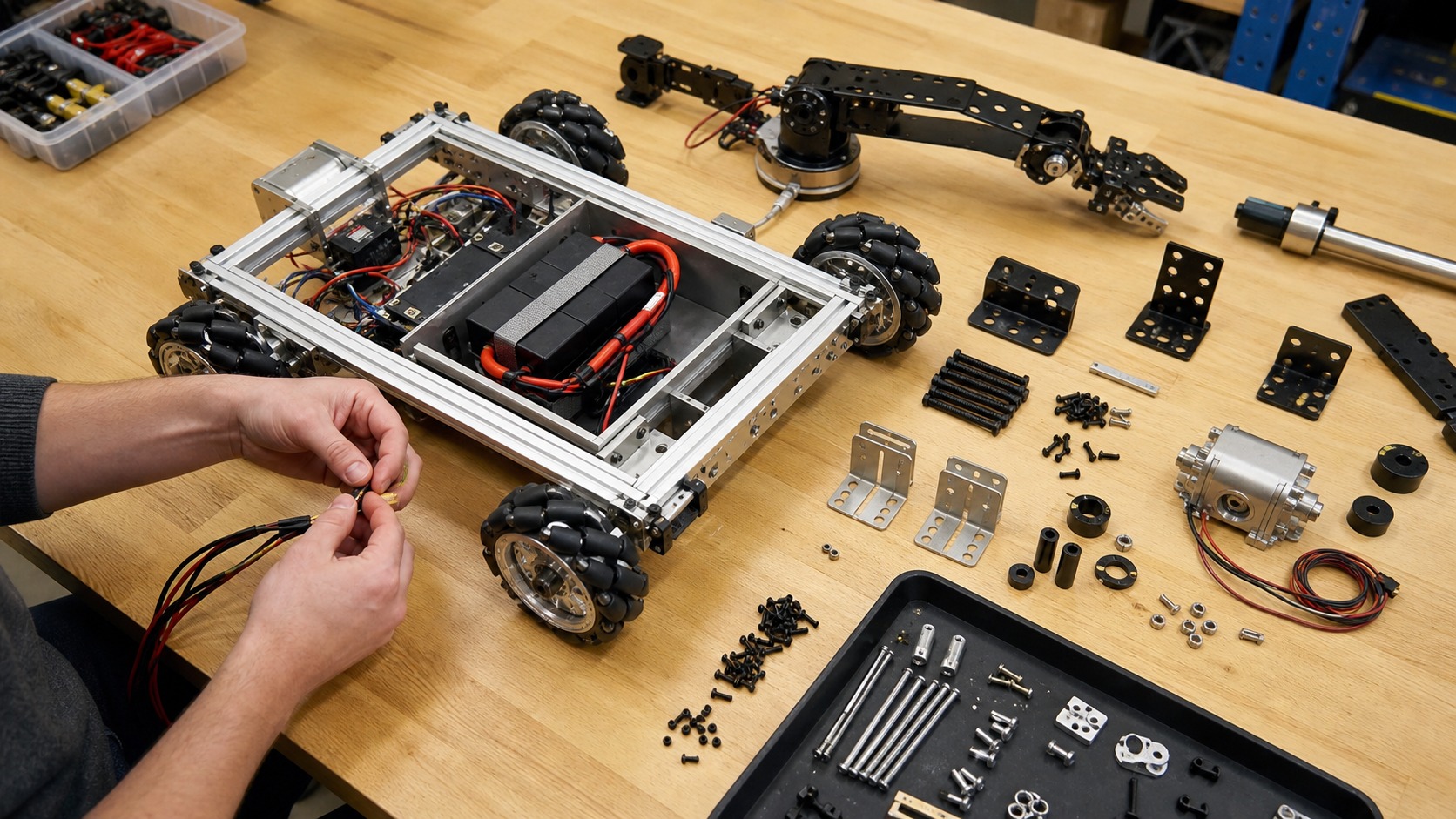
For beginners, the best starting projects are small enough to understand completely. A simple wheeled base, one-axis arm, pan-tilt camera mount, or gripper can teach frame stiffness, motor selection, wiring, sensors, fasteners, and debugging in a manageable way.
The main lesson is that hardware makes promises. It promises to hold shape, carry load, deliver energy, preserve measurements, and survive use. Robotics hardware engineering is the work of making those promises credible. That practical view is empowering. Hardware engineering gives beginners a way to turn a pile of parts into a machine whose behavior can be measured, explained, and improved. Once that habit forms, every prototype becomes easier to learn from, repair, and improve. The builder gains a practical way to separate mechanical trouble from electrical, sensing, and control problems.