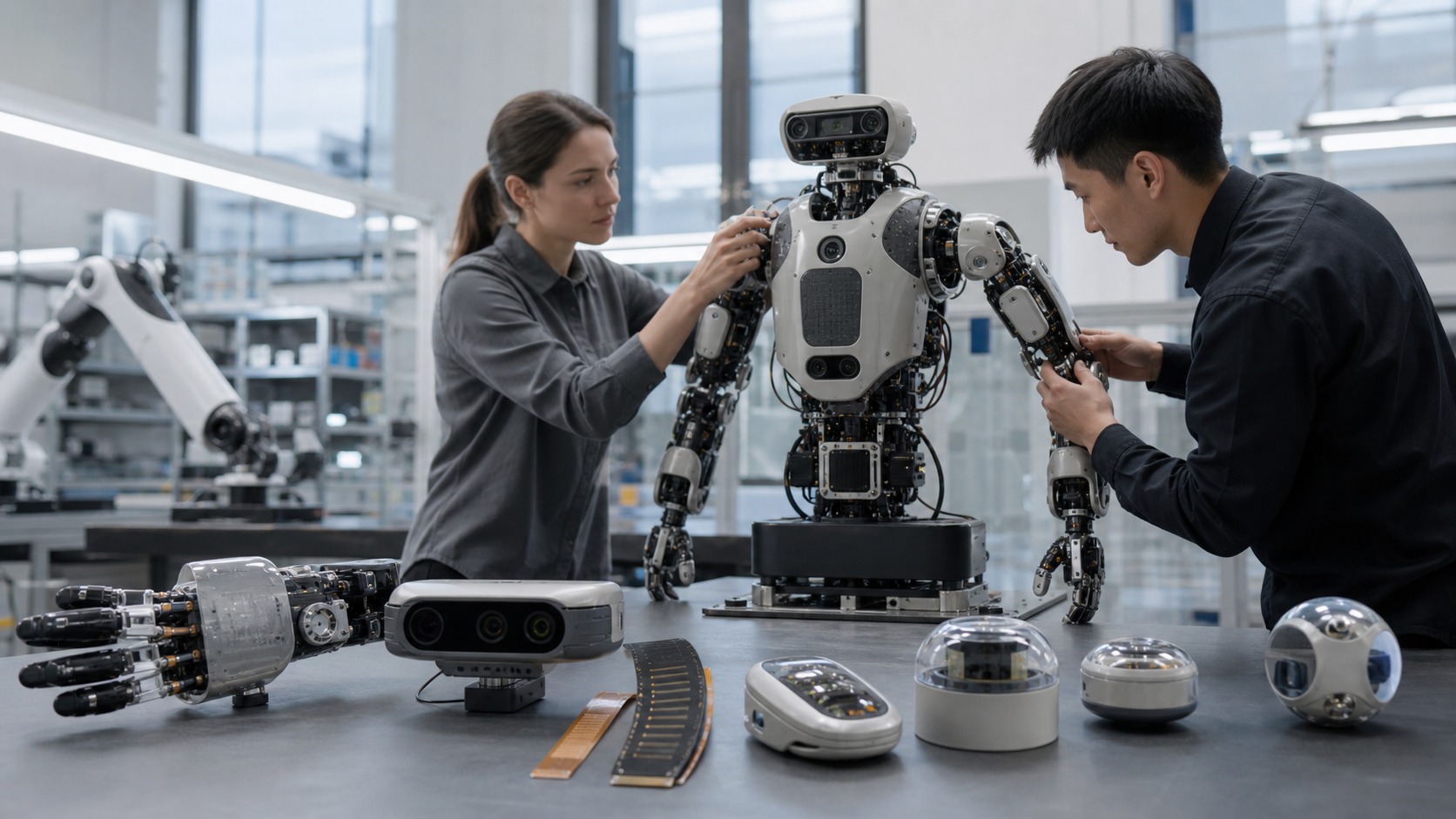
The Hardware That Lets Robots Notice the World and Themselves
Robotic sensors are devices that measure something useful and turn it into information a robot can use. They may detect distance, light, motion, position, touch, force, temperature, sound, pressure, orientation, speed, or electrical state. Without sensors, a robot can only follow commands blindly. With sensors, it can compare its plan with reality, detect obstacles, recognize objects, protect itself from heat, estimate where it is, and respond when contact happens. Sensors do not make a robot intelligent by themselves, but they give robot intelligence something real to work with.
A: Useful robots usually do, because sensors connect commands to physical reality.
A: Sometimes, but many robots need distance, motion, force, or internal state data too.
A: It combines multiple measurements to estimate state more reliably than one sensor alone.
A: Calibration connects measurements to the robot's actual geometry, timing, and physical units.
A: Yes. Lighting, vibration, noise, surfaces, heat, and damage can all mislead sensors.
A: They measure the robot's own motion, position, power, heat, or load.
A: They observe the environment around the robot, such as obstacles, objects, people, or surfaces.
A: A sensor can only measure well from a position that fits its view, contact, and stability needs.
A: Test range, noise, mounting, timing, and readings on real materials.
A: It should slow down, stop, request help, or compare another trusted measurement.
Sensors Turn Physical Conditions Into Data
Every sensor sits at the boundary between the physical world and the robot's software. A camera turns light into image data. An encoder turns wheel rotation into position counts. A force sensor turns pressure into an electrical signal. A temperature sensor turns heat into a measurement. The robot then uses that data to decide, adjust, or warn.
A beginner should remember that sensors measure, but they do not automatically understand. A camera does not know what a box is until software interprets the image. A lidar scan does not know which obstacle matters until mapping or planning code uses it. Sensors provide evidence. The robot's algorithms decide what that evidence means.
This is why sensor quality includes both hardware and interpretation. Good sensing is a system, not a part number.
Proprioceptive Sensors Tell the Robot About Itself
Some sensors measure the robot's own body. Encoders report wheel or joint motion. IMUs estimate acceleration and rotation. Current sensors can suggest motor load. Battery sensors report voltage and charge. Temperature sensors monitor electronics and actuators. These are often called proprioceptive sensors because they help the robot sense its own state.
This internal awareness is essential. A robot needs to know whether its wheels actually turned, whether its arm reached the commanded angle, whether it is tilting, and whether its components are overheating. Without internal sensors, even simple motion becomes guesswork.
Exteroceptive Sensors Observe the Outside World
Other sensors look outward. Cameras, lidar, radar, ultrasonic sensors, depth cameras, microphones, proximity sensors, and tactile surfaces help the robot understand its environment. They can detect obstacles, people, walls, objects, surfaces, sounds, or contact. These sensors are what make navigation, manipulation, inspection, and human interaction possible.
Different outward sensors see different kinds of reality. A camera captures rich visual detail but depends on lighting. Lidar measures distance directly but may struggle with some surfaces. Ultrasonic sensors are simple and inexpensive but coarse. Radar can work in difficult weather but offers different resolution. A good robot often combines sensors so one weakness is covered by another strength.
Sensor choice begins with the task. A robot does not need every sensor. It needs the evidence required for its job.
Vision Sensors Give Rich but Complicated Information
Cameras are powerful because images contain color, texture, shape, edges, and context. Robots use cameras for object recognition, navigation, inspection, line following, human detection, and visual servoing. Depth cameras add distance estimates, making it easier to locate objects in three dimensions.
Vision is also difficult. Lighting changes, glare, shadows, motion blur, dirty lenses, and confusing backgrounds can mislead algorithms. A camera mounted too low may miss obstacles. A camera mounted on a vibrating arm may produce blurred images. Robotic vision depends on optics, mounting, lighting, calibration, and software working together.
Distance Sensors Help Robots Avoid and Navigate
Distance sensors measure how far away things are. Lidar can produce detailed scans of nearby walls and obstacles. Ultrasonic sensors estimate range using sound. Infrared sensors can detect close objects. Depth cameras combine visual and distance information. These measurements help robots map spaces, avoid collisions, dock, and move safely.
Range sensing is not perfect. Shiny, dark, transparent, soft, angled, or absorbent surfaces can create odd readings depending on the sensor type. Beginners should test distance sensors against the actual materials and lighting the robot will face, not only against a clean wall in a lab.
Good navigation uses sensor confidence. If the robot knows a reading is uncertain, it can slow down, ask for another measurement, or use a different sensor.
Touch and Force Sensors Make Contact Smarter
Robots often need to touch things. Force-torque sensors, load cells, tactile pads, pressure sensors, and current-based estimates can tell a robot when contact occurs and how strong it is. This matters for gripping, assembly, walking, safety, and human-robot interaction. Touch sensing changes manipulation because the robot no longer relies only on vision. It can detect slip, confirm that an object is seated, reduce squeeze force, or stop when a person bumps the arm. In many tasks, the most important information arrives after contact begins. The challenge is placement and durability. A tactile sensor must be where contact happens, survive repeated use, and remain calibrated enough to be trusted.
Sensor Fusion Combines Partial Truths
No single sensor tells the whole story. Sensor fusion combines multiple measurements to estimate something more reliably. A mobile robot may combine wheel encoders, IMU data, and lidar scans to estimate position. A drone may combine IMU, camera, GPS, and barometer readings. A gripper may combine camera pose, motor current, and tactile feedback.
Fusion is useful because different sensors fail differently. Wheel encoders drift when wheels slip. Cameras struggle in poor lighting. IMUs drift over time. Lidar can be confused by glass. Combining sensors can reduce the impact of one weak measurement, but only if the system understands timing, calibration, and uncertainty.
Calibration Makes Measurements Meaningful
Calibration connects sensor readings to the robot's physical reality. A camera needs to know its lens properties and position. An encoder needs counts to match motion. A force sensor needs a baseline. An IMU needs orientation. Without calibration, a sensor may produce numbers that look precise but point to the wrong place or wrong force. Robots also need recalibration after repairs, impacts, sensor replacement, or mechanical changes. Beginners should treat calibration as part of the sensor, not as a one-time chore. A robot's perception depends on these relationships staying true.
Sensor Placement Is a Design Decision
Where a sensor is mounted can matter as much as which sensor is chosen. A camera needs a clear view. A lidar needs height and protection. An IMU should be mounted rigidly. A tactile pad should sit where contact occurs. A temperature sensor should be near the component that matters. Poor placement can ruin excellent hardware.
Placement also involves tradeoffs. A high sensor may see farther but be more exposed. A protected sensor may have a narrower view. A sensor near a motor may suffer vibration or electrical noise. Sensor design is part of robot design.
The Beginner Definition
Robotic sensors are the measurement devices that let robots notice the world, monitor their own bodies, and close the gap between command and reality. They include cameras, lidar, encoders, IMUs, force sensors, tactile pads, temperature sensors, current sensors, and many others. The important lesson is that sensing is not only about collecting data. It is about collecting the right evidence, from the right place, at the right time, with enough reliability that the robot can act safely and usefully.
A practical beginner way to classify sensors is by the question they answer. Where am I? How fast am I moving? What is near me? What am I touching? How hot am I? How much current am I drawing? Is the object slipping? These questions are easier to connect to robot behavior than a long catalog of sensor names.
Sensors also introduce uncertainty. A reading can be noisy, delayed, blocked, miscalibrated, saturated, or interpreted incorrectly. That does not make sensors untrustworthy. It means robots need filters, calibration, health checks, redundancy, and behavior that changes when confidence is low. Good sensing includes knowing when the measurement may be weak.
The timing of sensor data matters too. A fast robot using stale obstacle data can make poor decisions. A gripper reacting late to slip may drop the object. A balancing robot needs inertial feedback quickly enough to correct motion. Sensor selection therefore includes update rate, latency, and the software path from measurement to action.
Beginners should also think about the sensor's life on the robot. Will it get dusty? Can it be cleaned? Is the cable strained? Does vibration blur the data? Is it exposed to impact? Can it be replaced without disturbing calibration elsewhere? These practical details often decide whether a sensor remains useful after the first demo.
The best robots combine sensors with restraint. More sensing can help, but every sensor adds cost, wiring, data, calibration, and failure modes. A thoughtful robot uses enough sensors to act safely and effectively, then makes those measurements visible for debugging.
Robotic sensors are therefore not just the robot's eyes or ears. They are its evidence system. They let the machine compare expectation with reality, and they give human builders clues when reality refuses to cooperate.
A beginner should also separate raw data from useful state. A stream of camera pixels, encoder counts, or range readings is not yet an answer. The robot must filter, calibrate, timestamp, and interpret that data before it becomes position, obstacle distance, object pose, or contact force. Many sensor problems are interpretation problems.
Sensor redundancy is another useful idea. A mobile robot may use encoders for short-term motion, an IMU for rotation, and lidar for correction against the environment. If one sensor becomes uncertain, the others may keep the estimate useful. Redundancy is not about adding parts randomly. It is about covering important weaknesses.
The environment should guide sensor choice. A shiny factory floor, dusty farm row, dim hallway, wet sidewalk, or crowded classroom can each reward different sensing strategies. Testing sensors in the real environment is one of the fastest ways to avoid disappointment.
Finally, sensors need maintenance. Lenses get dirty, mounts loosen, cables fatigue, calibration drifts, and protective covers scratch. A sensor plan should include how the measurement will be checked later, not only how it works on the day it is installed.
A good sensor choice also respects failure behavior. If a range sensor is blinded, the robot should know enough to slow down, stop, ask for help, or use another source of evidence. The sensor is only one part of the safety story. The robot's response to weak evidence is just as important.
For beginners, the most useful mindset is to connect every sensor to a decision. If the robot will not change behavior based on a measurement, the sensor may be unnecessary. If the robot must make a critical decision, the measurement deserves testing, protection, calibration, and a clear backup plan.
This makes sensors less mysterious. They are not magical awareness modules; they are instruments with limits. Once a beginner learns to ask what a sensor can measure, how often it updates, where it is mounted, and what the robot will do when it is wrong, sensor selection becomes a practical design skill that supports every later robotics project and classroom prototype. Good sensing begins with clear questions.